

Kirana store online: take grocery orders on WhatsApp
Your regular customers already message you their lists. Give them a simple order page with your items and prices, and get every order on WhatsApp, ready to pack.
- ₹0 commission
- Works on any phone
- Gujarati, Hindi and English
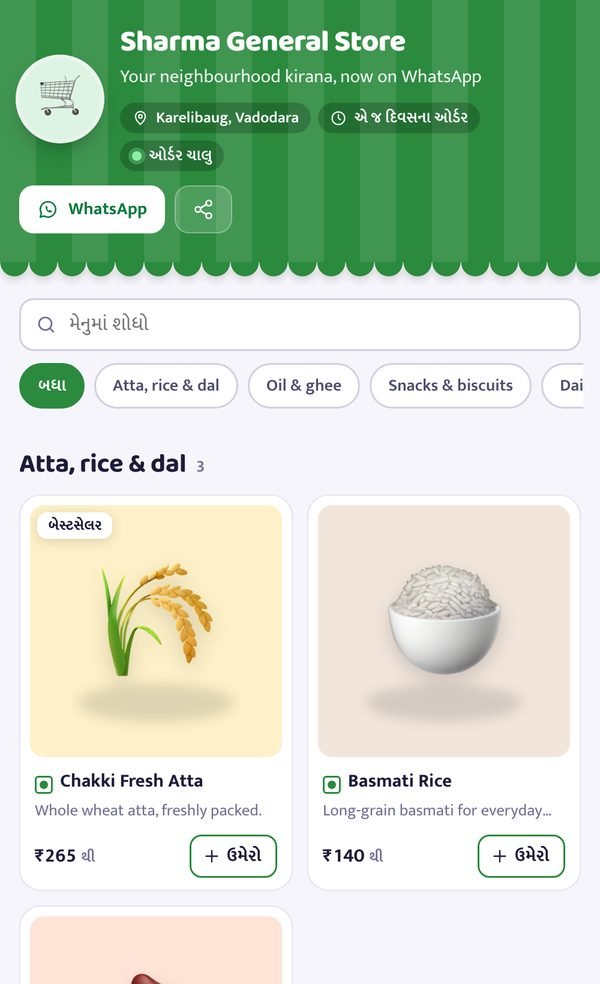
How can a kirana shop start taking orders online?
Make a shop link with the items you stock, share it with customers in your area, and receive the orders on WhatsApp. With PaasKart you can add 40+ common kirana items from a ready catalog, set your own prices and delivery areas, and get paid by UPI or cash on delivery.
Made for kirana and general stores
- A ready catalog: atta, rice, dal, oil, ghee, snacks, milk, soap and more, added in one tap
- Your own prices, pack sizes, and stock switched on or off
- Delivery areas, a delivery fee, free delivery above a value and a minimum order
- Same-day time slots, like 9 AM to 12 PM and 4 PM to 8 PM
- UPI with the amount filled in, or cash on delivery
- A customer list with weekly “order again” reminders
Go online in one evening
- 1
Pick your items
Choose from the kirana catalog and set your prices.
- 2
Set your area
Delivery areas, fee, minimum order and time slots.
- 3
Share the link
In your society, building and neighbourhood WhatsApp groups.
Join the waitlist
We are starting with a small group of sellers. Leave your details and we will message you on WhatsApp.
Thank you!
You are on the list. We will message you on WhatsApp before we start in your area.
Try the demo meanwhileFrequently asked questions
Do I have to add every product one by one?
No. Pick from a ready list of 40+ common kirana items, set your prices, and add them in one go. You can add your own items any time.
Can I deliver only in my area?
Yes. Write the areas you deliver to, your delivery fee, free delivery above a value and a minimum order.
Can customers pay cash on delivery?
Yes. You can accept UPI, cash on delivery or both.
Will this replace my billing software?
No. PaasKart is for taking orders from customers. You can keep using your billing system in the shop.